客戶系統 > 知識庫 > phpMyAdmin > 10. Renaming database tables with phpMyAdmin
10. Renaming database tables with phpMyAdmin
This tutorial assumes you've already logged in to phpMyAdmin
Now let's learn how to rename database tables
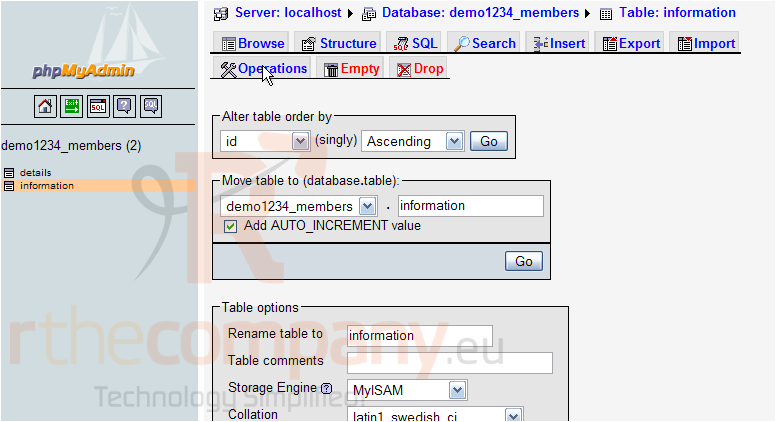
Click the database table you wish to rename
Then click the Operations button
Enter a new name for the table here
Then click Go
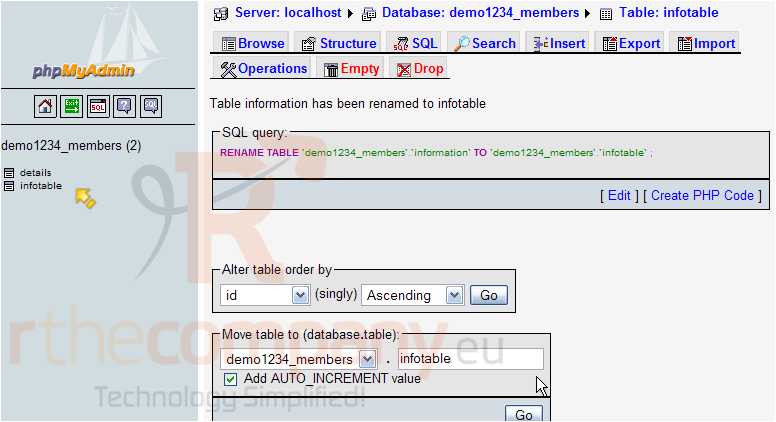
That's it! The information table has been renamed infotable, and is listed here
This is the end of the tutorial. You now know how to rename database tables using phpMyAdmin